



❓ What is this?
Planar Crinkle (crackling, rustling) — is a characteristic sound similar to plastic rustling or crackling that appears in planar magnetic headphones when:
- ✓ Putting on or taking off headphones quickly
- ✓ Making sudden head movements
- ✓ Pressing on the ear cup
- ✓ Intense movements of the facial muscles
This is NOT a defect — it’s a normal physical phenomenon inherent to planar magnetic driver design.
⚡ Physics of the Process
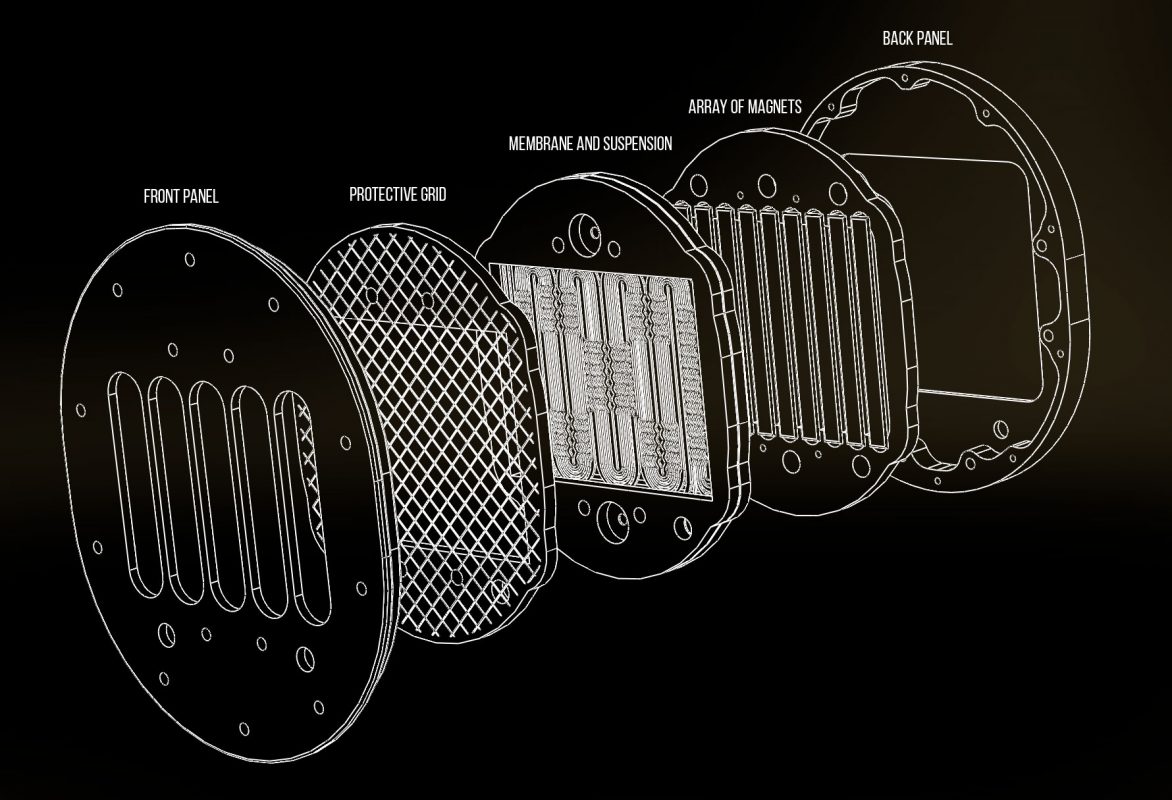
Why does this happen?
Planar magnetic headphones use an ultra-thin diaphragm (just a few microns thick — thinner than a human hair):
✓ Diaphragm Tension
Stretched between magnetic arrays with high tension for optimal sound quality
✓ Conductive Coil Tracks
Contains conductive coil tracks, creating an electromagnetic field
✓ Natural Wrinkles
Has wrinkles and folds — an inevitable consequence of the material and manufacturing
✓ Air Movement
Head movement creates air pressure changes, causing diaphragm flexing
Two Operating States
🔇 Idle State (No Signal)
When the music is not playing, the membrane is relaxed and hangs between the magnetic arrays. Since it is polymer, it behaves like a candy wrapper — some changes in air pressure or movement cause rustling or crunching. This is what you hear — the crinkle of the relaxed membrane.
Sometimes there may not be a crinkle on new headphones, but it will appear over time, in the process of natural use with a systematic stretching of the membrane. The appearance will occur randomly from the left or right, or from both sides at once.
🎵 Operating State (Music Playing)
As soon as a signal is applied to the membrane, the electromagnetic field is activated and the membrane becomes tense — it stands like a stake in the magnetic field, completely under its control. In this condition, rustling can only be present with intense head movements or the work of the jaw muscles. This does not affect the working process – the membrane is stressed and moves with perfect precision.
Why is tension critical?
| Tension Level | Result |
| ❌ Too Low | Bad sound, spontaneous rattling, vibrations. Rustling during playback, even when the head and facial muscles are stationary. |
| ✅ Optimal | The best sound. Rustle only with intense movement of the head and facial muscles or pressing on the cups. |
| ⚠️ Too High | There is no rustle, but the low frequencies disappear, the membrane rings like a taut string. |
🔍 When is this a problem?
✅ Normal (no repair needed):
- ✓ Light rustling when putting on/taking off headphones
- ✓ Crackling when pressing on the cup
- ✓ Sounds with quick head movements
- ✓ Crunching at rest during jaw movements
❌ Requires repair:
- ✗ Rattling while playing music when the head is stationary
- ✗ Significant deterioration of sound quality at certain frequencies at low volumes (rattling when working with a sine from 45 to 57 Hz)
- ✗ Visible tears or membrane delamination
🏆 How do other manufacturers feel about this?
✅ Honest approach (explains physics)
Audeze
Conclusion: Acknowledges it as a normal phenomenon with clear boundaries.
Dan Clark Audio (Aeon, Ether, Stealth)
Conclusion: They explain in detail the physics of what is happening. They are trying to offset this using their V-Planar technology.
⚠️ Avoidant approach (rarely mentions)
Hifiman
They admit it in tech support, but they don’t cover it very actively. There are a lot of complaints about crunching on the forums, but there is no official detailed explanation.
Meze Audio
Minimally mentions in documentation. Focuses on positive design aspects.
ZMF
They rarely mention it in tech support. They focus on the sound quality in the working condition of the membrane.
❌ Contradictory approach
Abyss
Has made contradictory statements. First: “normal for older models”, then: “new models don’t have this”. Creates confusion.
Final Audio
Prefers not to comment. Focuses on their own technology (Air Film Damping System).
📊 Manufacturer Comparison
| Manufacturer | Popular Model | Average Price Range | User Complaints | Official Response | Approach |
|---|---|---|---|---|---|
| Audeze | LCD / MM-500 | $800-$4500 | Frequent | Clear explanation | ✓ Honest |
| Hifiman | Arya V2 / XS | $1000-$8000 | Many | Minimal comments | ⚠️ Avoidant |
| Dan Clark Audio | Aeon 2 / Stealth | $500-$4000 | Rare | Complete explanation | ✓ Honest |
| Abyss | Diana V2 / 1266 | $3000-$9000 | Significant | Contradictory | ✗ Contradictory |
| Final Audio | D8000 Pro / D7000 | $3500-$4500 | Rare | No mention | ⚠️ Silent |
| ZMF | Atrium Pro / Auteur | $3500-$3900 | Minimal | Rarely mentioned | ⚠️ Silent |
| Meze | Empyrean / Liric | $2000-$4000 | Rare | No mention | ⚠️ Silent |
💡 Usage Guidelines & Care
The membrane of our isodynamic headphones is made of a polymer about 6-8 microns thick. This is an extremely fragile element. You must understand this and treat it with appropriate care.
Three Critical Vulnerabilities:
🔴 Mechanical Vulnerability
Any pressure (squeezing with fingers, hitting the cup against the cup with medium force, cups against the head) or dropping headphones can cause irreversible deformation.
🔴 Thermodynamic Sensitivity
Avoid rapid temperature fluctuations.
🔴 Acoustic Fragility
Exceeding the maximum recommended power (3W) can increase the amplitude of diaphragm movement, causing damage.
Power & Amplification Requirements
- ⚠️ Connecting headphones directly to weak signal sources (smartphones, laptops, DACs, audio cards) without an external amplifier will result in insufficient volume and detail. The diaphragm requires high magnetic field power for high resolution sound.
- ✓ Minimum acceptable sound: 400mW amplification
- ✓ Operating power: 1W and above
✅ How to Properly Use Your Neuropunk Headphones
- ✓ Put on and take off headphones on your head carefully, supporting the cups with your hands without sudden movements
- ✓ Do not make a quick habitual throwing of headphones on your head — this will create an air shock
- ✓ Do not clap the cups together for the same reason
- ✓ Do not drop the headphones
- ✓ Avoid mechanical pressure on the cups and diaphragms
- ✓ Keep fingers away from inside the cups
- ✓ Keep the internal cavity of the cup clean — any hair on the diaphragm can cause unpleasant resonances
- ✓ Store headphones on a stand when possible
❌ What NOT to Do
- ✗ Do not subject the headphones to temperatures above +45°C
- ✗ Avoid humidity above 80%
- ✗ Do not use alcohol-based cleaning products on leather elements
- ✗ Do not disassemble or repair the magnetic-diaphragm system yourself
- ✗ Do not allow cable twisting or sharp angle bending
💡 Additional Recommendations
- ✓ Do not adjust the headband while wearing the headphones — remove them first
- ✓ For a tighter fit to match your head shape, carefully twist both cups inward or outward gently and simultaneously
- ✓ Movable joints can be lubricated with a small amount of silicone or grease lubricant
✨ Conclusion
Planar crinkle is a normal physical phenomenon, not a manufacturing defect.
It happens with all planar magnetic headphones: from budget models to flagships, from every manufacturer without exception. It’s a result of using ultra-thin diaphragms for excellent sound.
✅ If you hear light rustling during movement — this is normal.
⚠️ If this affects the sound when the head is stationary, contact the service.
Choosing planar headphones is choosing sound quality. With proper care, you’ll enjoy years of exceptional audio performance.
📋 Warranty Terms & Support
Warranty Period: 12 months from date of purchase
✓ What’s Covered:
- Defects in materials and manufacturing
- Electronics and wiring problems under normal use
- Diaphragm failure during normal operation
✗ Not Covered:
- Mechanical damage due to user mishandling
- Damage from improper use or unauthorized repairs
- Natural wear of ear pads and cosmetic elements
- The natural crinkle of the membrane at rest
How to Get Support
📧 Email Support (Warranty Claims)
Contact us: admin@neuropunk.ru
Subject line: “Warranty”
Include: order number and problem description. We’ll contact you with shipping instructions for repair or replacement.
💬 Live Chat Support
Telegram: @neuropunkgear
For urgent questions and quick assistance
The guide is based on an analysis of official manufacturer responses, technical documentation, and user feedback from the international audiophile community, which are publicly available.
© 2026 | All information is current as of the document creation date